'Apple Intelligence' Features for Writing and Photos
Email Summarization and Reply Functions... Notification Priority Settings
Call Recording and Find My App Now Available
On the 1st, Apple applied its artificial intelligence (AI) feature 'Apple Intelligence' to eight languages, including Korean. Users can change the style of their writing using writing tools or refer to expert knowledge provided by ChatGPT. This is expected to help perform tasks more quickly and easily.
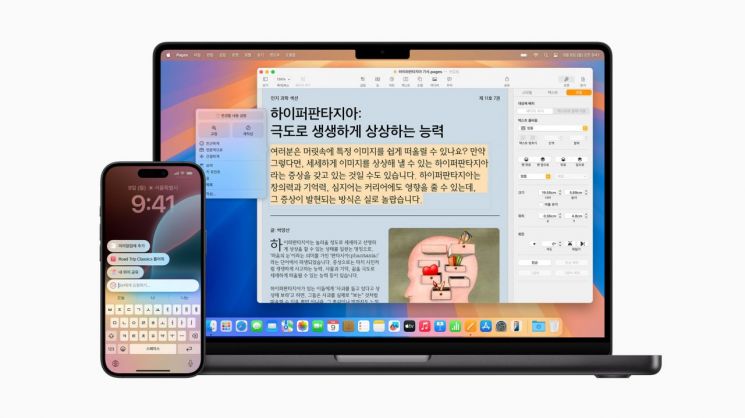
On the same day, Apple announced, "With the release of iOS 18.4, Apple Intelligence is expanding to more users worldwide and supports functions in eight new languages, including Korean and French," adding, "It is based on on-device processing designed to protect users' privacy."
First, the writing tools assist in rewriting, proofreading, and summarizing text in email, messaging, and note applications. Users can select an appropriate tone from styles such as 'professional,' 'concise,' or 'friendly' to rewrite their text. The proofreading tool checks grammar, vocabulary, and sentence structure while suggesting editing directions with explanations.
If unwanted objects or people are included in a photo frame, the cleanup tool in the Photos app can remove only the distracting elements while preserving the moment you wanted to capture.
In a new section at the top of the email inbox, users can check the most urgent emails, such as today's scheduled lunch plans or boarding passes, through prioritized messages. Users can view summaries without opening messages in the inbox, and for long threads, simply tapping or clicking 'Summarize' reveals relevant details. The smart reply feature suggests reply content for quick responses and identifies questions in emails to ensure no answers are missed.
Additionally, users can set notification priorities and have key information from summarized notifications displayed directly on the lock screen, allowing them to focus on their current tasks by quickly scanning through accumulated notifications.
Phone call recording is also available. Audio can be recorded and summarized in the Notes and Phone apps. When recording starts during a call in the Phone app, all parties are automatically notified that recording is in progress, and after the call ends, a summary is generated to help review the key points.
The newly enhanced Siri understands what is said even if the user stammers a little and can follow the context between previous and subsequent requests.
The new visual intelligence offers various functions such as translating text in multiple languages and detecting phone numbers or email addresses to provide options for adding them to contacts. Users can receive problem-solving assistance from ChatGPT, such as searching for purchase locations of items via Google search or requesting explanations for complex diagrams noted during class.
Users can also request ChatGPT to generate content for what they are writing through the 'Compose' feature of the writing tools used system-wide, and add images that match the written content using ChatGPT's image generation feature.
Apple stated that Apple Intelligence is based on on-device processing designed to protect users' privacy at every stage. For requests requiring larger models, private cloud computing flexibly adjusts and scales computing performance while protecting users' personal information, enabling the handling of more complex requests.
Apple said, "We are the first in the industry to allow independent experts to verify compliance with privacy principles," adding, "Apple Intelligence equipped with private cloud computing demonstrates progress in AI privacy protection while implementing intelligence that users can trust."
Meanwhile, Apple also announced that in Korea, users can now use the Find My app to check the location of their Apple devices and personal belongings on a map and share their location with family and friends.
If users cannot remember where they placed their device or have lost it, they can use the Find My app to check the route to the device's location and make the lost device play a sound when it is nearby. When a device is set to Lost Mode, it immediately locks, disables all Apple Pay payment information, and displays a message with contact information for the person who finds the lost device. To prevent misuse of a lost device, users can also remotely erase the information stored on the device.
© The Asia Business Daily(www.asiae.co.kr). All rights reserved.
![Clutching a Stolen Dior Bag, Saying "I Hate Being Poor but Real"... The Grotesque Con of a "Human Knockoff" [Slate]](https://cwcontent.asiae.co.kr/asiaresize/183/2026021902243444107_1771435474.jpg)