KISA Security Notice
"SKT Will Never Ask You to Install a Remote Control App"
There have been recent reports of attempts to exploit the SK Telecom USIM (Universal Subscriber Identity Module) hacking incident for voice phishing and smishing scams, prompting a call for heightened vigilance.
On May 8, the Korea Internet & Security Agency (KISA) announced via a BohoNara security notice that text messages containing phrases such as "SKT USIM hacking" and "malicious app infection" are being circulated. KISA confirmed that these messages are being used to trick users into installing malicious apps and stealing sensitive information.
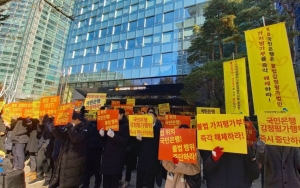
 Subscribers line up in front of the agency on the first day SK Telecom started the free USIM replacement service. Photo by Kang Jinhyung
This phishing scheme involves impersonating government agencies or SK Telecom to lure victims into calling a fake customer service number, after which they are instructed to install a remote control app. Attackers first claim reasons such as security checks, malicious app inspections, or compensation for damages to persuade victims to directly install a remote control app from an official app store.
According to phishing scenario examples released by KISA, messages like "Mom needs to change her USIM, reply if you see this text," or "Your phone's USIM has been hacked," were used to prompt responses. Once the user replies by phone or text, the attacker says, "We will provide remote inspection support," and induces the user to install and run a legitimate remote control app. Afterwards, the attacker installs a malicious app, such as a fake "Compensation Bureau" pretending to be the Korea Consumer Agency, to steal personal information. Once such an app is installed, the attacker can remotely control the user's smartphone, extract not only personal information but also financial data and other sensitive details, or install additional malicious apps.
KISA emphasizes that if you receive a suspicious contact that could be phishing, you must report and verify it. You can file a report through the "Integrated Report" section of the "Telecommunications Financial Fraud Integrated Reporting and Response Center," or by pressing "Report as Spam" on your smartphone's message screen. In addition, you can use the "Smishing Verification Service" on the KISA BohoNara KakaoTalk channel to report and check for malicious content.
Simply clicking on an internet link in a text message will not infect your device with a malicious app. However, if you installed an app via such a link, it is recommended to delete the malicious app using a mobile antivirus program, manually remove any malicious apps, and visit a service center as necessary.
KISA stated, "You should avoid clicking on and immediately delete website addresses from unknown sources," and added, "For suspicious website addresses, you can prevent damage by checking whether they match legitimate sites." KISA also advised, "Personal information such as phone numbers, IDs, and passwords should only be entered on trusted sites, and since authentication numbers can be linked to mobile payments, you should double-check before entering them."
If you suspect information leakage due to malicious app infection or a phishing site, you can apply for the "Number Spoofing SMS Blocking Service" to prevent secondary damage. KISA also warned, "If you become infected with a smishing malicious app or enter personal information on a phishing site, you may suffer losses through mobile payments, so you should check your transaction history."
© The Asia Business Daily(www.asiae.co.kr). All rights reserved.
![Clutching a Stolen Dior Bag, Saying "I Hate Being Poor but Real"... The Grotesque Con of a "Human Knockoff" [Slate]](https://cwcontent.asiae.co.kr/asiaresize/183/2026021902243444107_1771435474.jpg)