Dunamu, the operator of the virtual asset exchange Upbit, announced on the 27th that it has added four new features to enable users to manage orders more conveniently.
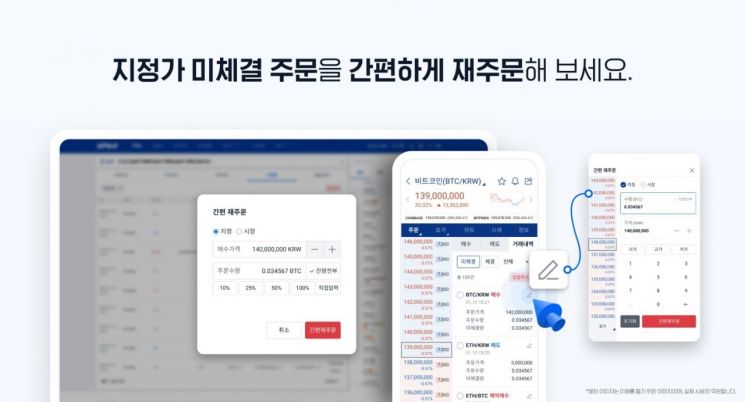
With this update, ▲Simple Reorder ▲Unfilled Order Line ▲Bulk Cancel ▲Swipe to Cancel features have been introduced, making order management much easier.
First, Simple Reorder is a function that cancels unfilled limit orders and allows users to place new orders more easily. Previously, users had to re-enter all information when placing a new order after canceling an order, but now they can simply modify the existing order details to place a new order conveniently.
The Unfilled Order Line is a feature available on the Upbit PC web version’s TradingView chart, allowing users to manage unfilled limit orders by moving the order line with the mouse cursor. Users can move the order line up or down to cancel the existing order and place a new order at the changed price.
Bulk Cancel is a function that allows users to cancel multiple registered unfilled orders at once. It eliminates the hassle of canceling orders one by one and supports canceling up to 300 orders at a time.
Lastly, Swipe to Cancel is supported in the mobile environment. Users can cancel an unfilled order by swiping it to the left and selecting the trash bin icon that appears.
This update focuses on enabling users to manage orders more quickly and intuitively. As a leading exchange in the industry, Upbit continues to promote user-centered service improvements based on strong technological capabilities.
A Dunamu official said, "After careful consideration to provide a world-class trading environment, we added features that allow orders to be managed more intuitively and conveniently. We will continue to listen to users’ voices and innovate to create the best trading environment."
© The Asia Business Daily(www.asiae.co.kr). All rights reserved.
![Clutching a Stolen Dior Bag, Saying "I Hate Being Poor but Real"... The Grotesque Con of a "Human Knockoff" [Slate]](https://cwcontent.asiae.co.kr/asiaresize/183/2026021902243444107_1771435474.jpg)