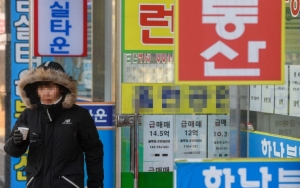
As the mobile application (app) Ddokdak for medical service reservations gains popularity, controversy over reverse discrimination against so-called digital refugees, including the elderly, is intensifying. Since it is an app related to medical services, which are essential social goods, there are also calls for proper usage guidance for these groups.
The Ddokdak app, which has been in service for seven years, is popular because it allows users to make medical appointments with just a few smartphone taps, reducing unnecessary waiting times. Currently, the cumulative number of subscribers has exceeded 10 million, and many hospitals have adopted the service.
However, recently, elderly people who do not know how to use the app, as well as child patients and their guardians who register in person, have experienced inconvenience. In particular, even within a single hospital, overlapping of on-site waiting customers and Ddokdak reservation customers often causes longer waiting times for medical treatment. Some hospitals only accept reservations through Ddokdak, causing those unfamiliar with digital devices, including the elderly, to leave without receiving treatment.
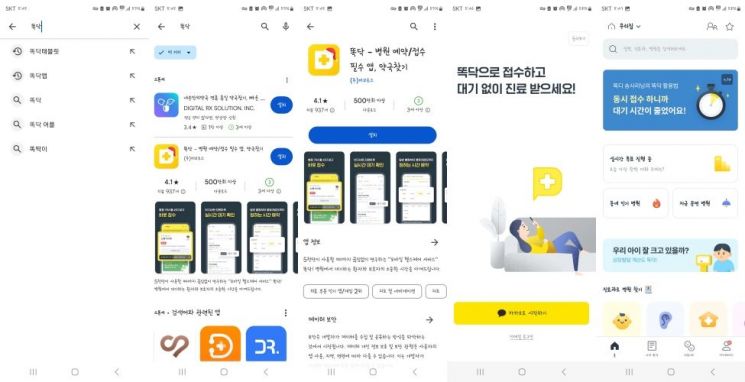
However, if you have a smartphone, using the Ddokdak app is simple. First, on Android systems such as Samsung Galaxy, download and install the Ddokdak app through 'Google Play,' and on iOS systems such as Apple iPhone, through the 'App Store.'
After installation, when you run the Ddokdak app, you go through a simple identity verification process, then you can use the hospital appointment service after a paid subscription of 1,000 KRW per month or 10,000 KRW per year. The reservation method is not complicated. When you select the type of hospital you want, such as internal medicine, pediatrics, or orthopedics, a list of nearby hospitals appears.
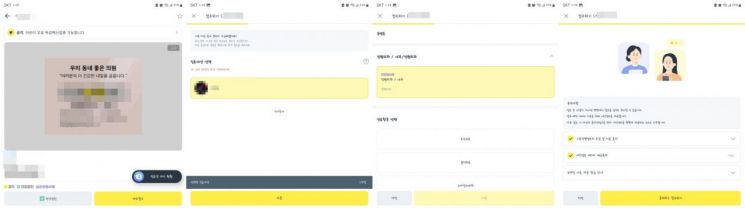
Among these, select the desired hospital and click the 'Immediate Registration' button to choose the patient. Here, you can register two or more people simultaneously, including yourself and family members. After selecting the patient, press 'Next' to choose the medical service. Then, check the boxes for consent to the collection and use of unique identification information and consent to the provision of personal information to third parties, and click 'Agree and Register' to complete all reservation procedures.
After completing this simple procedure and arriving at the hospital within 30 minutes, you can receive medical treatment without a long wait. However, even if you register through Ddokdak, some hospitals may automatically cancel the reservation if you fail to arrive when your turn comes, so caution is advised.
© The Asia Business Daily(www.asiae.co.kr). All rights reserved.
![Clutching a Stolen Dior Bag, Saying "I Hate Being Poor but Real"... The Grotesque Con of a "Human Knockoff" [Slate]](https://cwcontent.asiae.co.kr/asiaresize/183/2026021902243444107_1771435474.jpg)