Spyware Easily Installed via Texts and Links
Can Secretly Activate Camera and Microphone for Surveillance and Eavesdropping
Regarding smartphone security, Android phone users such as those with Galaxy devices should pay attention to the 'green light' at the top of the screen that they may have previously overlooked. This could be a signal indicating that a hacker is monitoring the smartphone.
On the 22nd (local time), the British daily newspaper Daily Mail published an article titled "Why You Should Never Ignore the Green Light on Your Android Screen." The green light at the top of the screen currently indicates that the smartphone's microphone or camera is active. If the user is using voice or facial recognition, or the camera or microphone through an application (app), it is not a big issue. However, if not, it is necessary to check whether spyware has been installed on the smartphone.
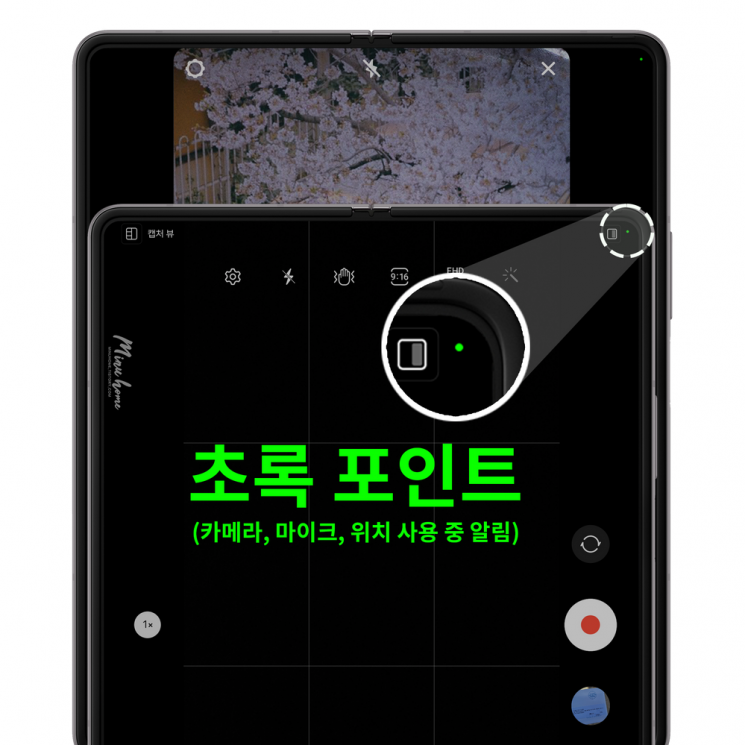 The green light at the top of the screen indicates that the smartphone's microphone or camera is currently active.
 [Photo by Samsung Members Community]
Spyware refers to programs installed without the user's consent that secretly steal personal information. When spyware is installed on electronic devices including smartphones, it can secretly steal various personal information such as user IDs, passwords, card numbers, and digital certificates. It can even turn on the camera or microphone to monitor or eavesdrop, so special caution is required.
Above all, experts point out that if a green or orange light appears even when no app is being used, hacking or spyware should be suspected. They emphasize that users should first check which app activated the green light and then restrict the camera or microphone permissions granted to that app.
Installation of Malicious Programs, In Reality, A Moment of Carelessness is Targeted
 The movie , which was released on Netflix earlier this year and gained popularity, raised public awareness about smartphone security.
 [Photo by Netflix]
The movie Just Dropped My Smartphone, which was released on Netflix earlier this year and gained popularity, raised public awareness about smartphone security. The protagonist Nami (played by Cheon Woo-hee) loses her smartphone, and later, Junyoung (played by Im Si-wan), impersonating an AS technician, directly installs spyware on Nami’s smartphone to plant a malicious program.
This scene in the movie was criticized as contrived, but actual security experts say that secretly installing malware or spyware on smartphones is easier in reality than depicted in the film. They warn that malicious programs can be easily installed on smartphones through smishing texts or KakaoTalk links, which are commonly received by the general public asking to "check the delivery."
Moreover, even if the user does not intentionally install anything, the smartphone can become infected with spyware during the process of interpreting the content of such messages. Security experts say that malicious codes like spyware evolve rapidly, so it is impossible to defend against them 100% perfectly. However, they note that following basic preventive measures can minimize damage.
For example, users should always update their operating system (OS) to the latest version and develop the habit of checking for malware infections in real time using security programs. Most importantly, apps should be downloaded from trusted official sites.
Additionally, experts recommend not sharing overly detailed personal information online on SNS and other platforms to prevent secondary damage from information leaks. They also advise implementing additional account authentication procedures, including biometric authentication methods such as fingerprint or iris recognition, when using messenger, SNS, or email account services.
It is also good to learn how to remotely control your smartphone in case of possible theft. For iPhone users, the "Find My iPhone" feature is helpful. Android users can protect their smartphones remotely through their Google account.
© The Asia Business Daily(www.asiae.co.kr). All rights reserved.
![Clutching a Stolen Dior Bag, Saying "I Hate Being Poor but Real"... The Grotesque Con of a "Human Knockoff" [Slate]](https://cwcontent.asiae.co.kr/asiaresize/183/2026021902243444107_1771435474.jpg)