Uploading Video Reviews with Clip Editor on Place
Naver announced on the 10th that it has launched 'MY Place Clip' to further activate video review content within Place.
Users can add stickers, text, music, and more to videos using the clip editor. The clip editor for Place is initially supported on the Naver app. Naver plans to support users in creating MY Place Clips on the Naver Map app in the future.
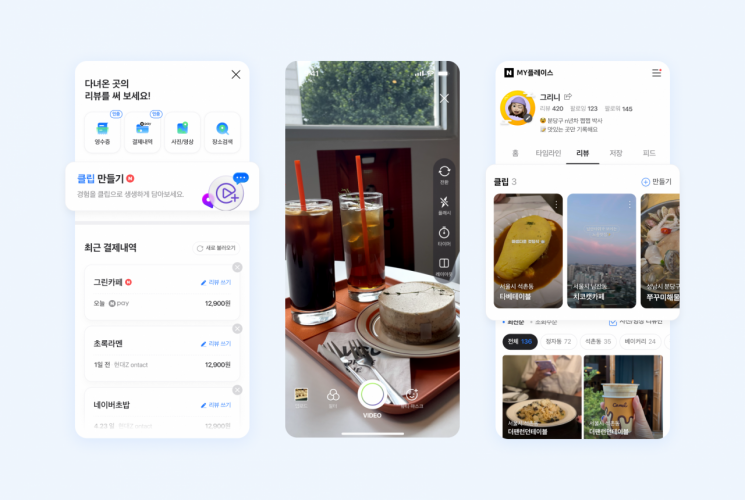
With this update, users can leave not only ▲keywords ▲text ▲photo and video reviews but also ▲MY Place Clip reviews on MY Place. MY Place reviewers can easily and conveniently record their visit experiences without separate editing tools by utilizing various shooting modes and video editing features of the clip editor. When a place introduced in a MY Place Clip is tagged using the 'Add Location' feature and the review is uploaded, the review is displayed in the clip section of the corresponding Place page. MY Place Clips can be found not only on Place but also on various Naver services such as the clip tab on the Naver app. The company expects this to expand the contact points between local businesses and potential customers.
In fact, 'video reviews' are becoming more active on MY Place. Since the video review feature was introduced in April last year, the number of video reviews accumulated on Place (as of August) has increased by about 300% compared to the previous year. In particular, about 70% of MY Place reviewers are users in their teens and 30s, showing active participation from the younger generation.
Choi Ji-hoon, the leader in charge of Naver Place reviews, said, "Among users who enjoy visiting trendy places and leaving records, reviews on MY Place are becoming 'local content' that reflects the personality of reviewers, rather than just evaluation information." He added, "We plan to enhance the service so that users can naturally discover places worth visiting through the review content accumulated on MY Place."
© The Asia Business Daily(www.asiae.co.kr). All rights reserved.