Increase Font Size and Arrange Each Function Intuitively
Hyundai Card has revamped its application (app) to make it easier for elderly customers who are less familiar with digital services to use.
On the 30th, Hyundai Card announced the launch of a 'Light Mode' that features only the main functions of the Hyundai Card app, designed specifically for seniors who are not accustomed to mobile services.
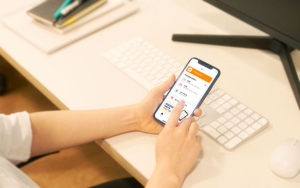
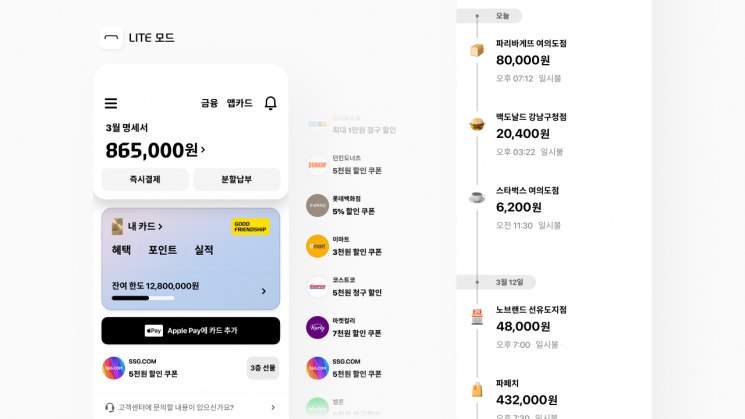
Hyundai Card analyzed the functions most frequently used by members aged 60 and above and reorganized the app accordingly. First, to prevent users from getting lost within the app, all relevant information can be viewed at a glance simply by opening the app and scrolling down the screen.
At the very top of the app's home screen, the 'Monthly Statement' is placed. Functions such as 'Immediate Payment' and 'Installment Payment,' which allow users to pay the billed amount before the due date or in installments, are positioned alongside the monthly statement content so users do not need to search for them separately.
Below the monthly statement, the 'My Card' section is located, where users can check the benefits, points, and performance of their credit cards. To make it easy for elderly members to make inquiries, a customer center connection guide is placed in the center of the home screen. Below the customer center guide, recent usage history is displayed in chronological order. This allows users to naturally check their information as soon as they open the app.
Readability has also been improved. The font size has been increased by up to 30% compared to before. Recent usage history is also categorized by day, allowing users to intuitively check their credit card usage records.
Any Hyundai Card member aged 60 or older (born before 1963) can use Light Mode. Users can select Light Mode from the 'Change Mode' option in the main menu. For more details, please check the Hyundai Card app.
© The Asia Business Daily(www.asiae.co.kr). All rights reserved.