[Asia Economy Reporter Seungjin Lee] AhnLab announced on the 25th that it has consecutively discovered attack cases where users' Microsoft 365 (hereinafter MS 365) accounts are hijacked through phishing emails disguised as work-related content such as missed call notifications and fax receipt confirmations, urging users to be cautious.
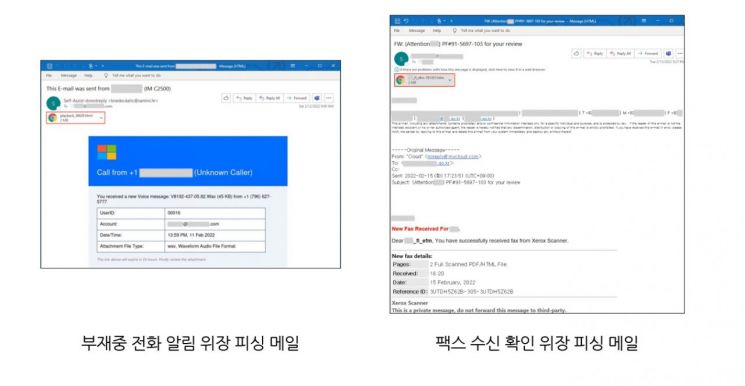
First, in the case of missed call notification disguise, the attacker sent an email titled "This E-mail was sent from ○○○" (○○○ being the domain part of the recipient's email). The email body stated that a voice message recorded during the missed call was attached, along with a file named "playback_38629.html," meaning "replay." When the user opens the attachment, they are directed to a phishing site very similar to the MS 365 login page.
In the case of emails disguised as fax receipt confirmations, the attacker sent an email with a fake document number and the subject "for review." The attacker included a message in the body stating "The fax was successfully received by the scanner" and attached a file linking to a phishing site. When the user opens the attachment, they are led to a phishing site that prompts for the MS 365 account password.
The login-disguised phishing sites used in both attacks are designed to appear as if the user's email address is already entered, allowing users to input their passwords without suspicion. Once the password is entered, it is immediately sent to the attacker. Moreover, additional damage can occur as information within programs linked to the account may also be stolen, requiring users to exercise special caution.
Currently, AhnLab's V3 product line blocks these phishing sites.
To reduce damage from phishing, users should adhere to basic security guidelines such as ▲ verifying the sender and source of emails ▲ refraining from opening attachments or URLs in suspicious emails ▲ using different accounts for different sites and regularly changing passwords ▲ keeping antivirus programs like V3 updated and enabling phishing site blocking features ▲ maintaining the latest versions and security patches of programs in use (OS/internet browsers/office software, etc.).
Kim Sung-kyung, a researcher at AhnLab's analysis team, said, "If users are deceived by phishing sites and enter account information used within their organization, there is a risk of not only personal information but also organizational information being stolen, so special caution is required," adding, "To prevent damage, attachments or URLs in suspicious emails should not be executed."
© The Asia Business Daily(www.asiae.co.kr). All rights reserved.