[Asia Economy Reporter Buaeri] Amid the online school openings due to the novel coronavirus infection (COVID-19), AhnLab disclosed security guidelines on the 10th to prevent security incidents during remote classes.
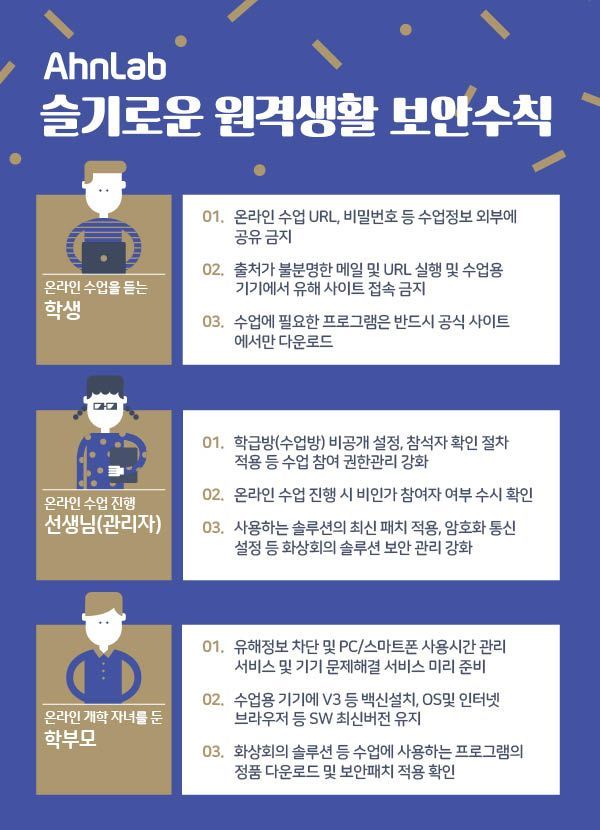
These security guidelines summarize the key security rules that each participant in online classes?elementary, middle, and high school students and teachers conducting online classes, as well as parents with children attending online classes?must follow.
Students attending online classes should not share class information such as online class links (URLs), passwords, or class screens with outsiders.
They must not access harmful sites (illegal free video sites, illegal download sites, etc.) on devices used for classes, and must download necessary programs only from official websites.
Since security threats targeting students attending online classes may occur, messages from unclear sources (Facebook, KakaoTalk, Instagram, email, text messages, etc.) should not be opened, and harmful sites (illegal free video sites, illegal download sites, etc.) must not be accessed on class devices (laptops, PCs, smartphones, etc.).
There may be phishing sites impersonating major program downloads, so class programs must be downloaded only after verifying the official site.
Teachers conducting online classes should set the class room (classroom using video conferencing solutions) to private, share passwords only with participants, and strengthen class participation authority management by applying participant verification procedures.
Teachers should frequently check for unauthorized participants during online classes, apply the latest patches for the solutions used, and strengthen security management of video conferencing solutions by setting encrypted communication.
When opening a class room using video conferencing solutions, teachers must set it to private for security and share passwords only with participants. Additionally, they should implement extra verification procedures such as text message responses or face recognition to confirm participants.
Security incidents and vulnerabilities of video conferencing solutions used for online classes should be continuously monitored (through news articles, developer announcements, AhnLab security information), and security management such as applying security patches and setting encrypted communication should be diligently maintained.
Parents should prepare device troubleshooting services in advance. Antivirus software such as V3 should be installed on class devices, and the OS (operating system) and internet browsers should be kept up to date. Genuine versions of programs used for classes, such as video conferencing solutions, must be downloaded, and the application of security patches should be confirmed.
Due to the first-ever online school openings caused by COVID-19, issues such as excessive IT device usage time by children, exposure to harmful information, absence from classes due to device malfunctions, and infections by malware such as ransomware have increased. To prevent these, it is advisable to prepare 'child protection services' that block harmful information and manage PC and smartphone usage time in advance. It is also recommended to subscribe in advance to services that can remotely resolve sudden device problems.
Park Taehwan, head of AhnLab ASEC Response Team, said, “To safely conduct classes during the first-ever online school openings, security awareness of all participants?including participants, administrators, and parents?is more important than that of any single member,” adding, “However, if realistic basic security guidelines are practiced one by one rather than vague worries, a ‘wise remote life’ can be achieved.”
© The Asia Business Daily(www.asiae.co.kr). All rights reserved.
!["The Woman Who Threw Herself into the Water Clutching a Stolen Dior Bag"...A Grotesque Success Story That Shakes the Korean Psyche [Slate]](https://cwcontent.asiae.co.kr/asiaresize/183/2026021902243444107_1771435474.jpg)