Register via Apple Wallet or Tmoney iOS App
Pay Transit Fare Without Unlocking Device
Usable Even in 'Power Reserve' Mode When Battery Is Low
Now, Apple Pay users in Korea can use Tmoney transit cards directly in the Apple Wallet application. Without a physical card, users can conveniently and securely access various modes of transportation using only their iPhone or Apple Watch. Even iPhone users who do not have a Hyundai Card can use the same features by registering a card in the Mobile Tmoney app.
On July 22, Apple and Tmoney announced, "We are introducing a new way to use public transportation that is easy and convenient."
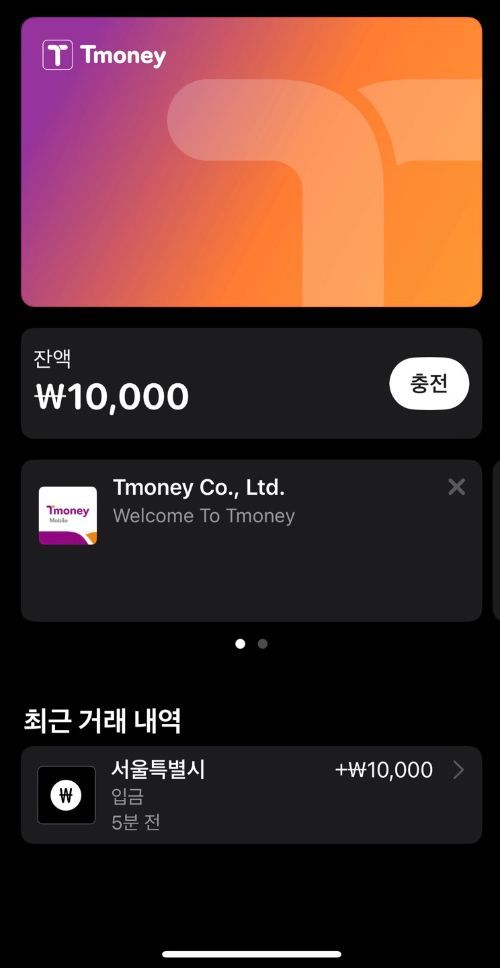
There are two ways for iPhone users to register a Tmoney transit card. Existing Apple Pay users can simply add a prepaid Tmoney card in the Apple Wallet app. Users can select the add (+) button in Apple Wallet, go to 'Transit Card,' and follow the instructions to add a Tmoney card.
If the Tmoney card balance falls below a certain amount, users can recharge it manually or set up automatic recharge through either Apple Wallet or the Mobile Tmoney iOS app.
To change the automatic recharge setting, select 'Card Details' in Apple Wallet and tap 'Automatic Recharge.' Users can also set up automatic recharge or top up their balance using Apple Pay and other payment methods in the Mobile Tmoney iOS app.
Notably, when Express Mode is enabled, users can board transportation simply by holding their iPhone or Apple Watch near the terminal, without unlocking the device or turning on the screen. Additionally, even in 'Power Reserve Mode'?when the iPhone needs charging?the transit card function can be used for up to five hours.
However, since a Hyundai Card is required to use Apple Pay, users must have a Hyundai debit or credit card to register a Tmoney card and add funds in Apple Wallet.
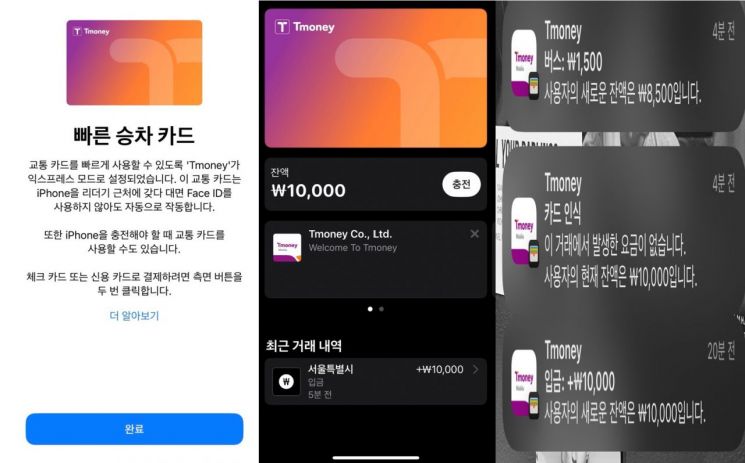 iPhone screen after registering a transportation card for iPhone users in the Mobile Tmoney application, then charging and making a payment.
iPhone users without a Hyundai Card can update the Mobile Tmoney app to the latest version, issue a new Mobile Tmoney card, and recharge it to use the same features.
After registering a card in this way, I boarded a bus and tapped my iPhone on the bus terminal in Express Mode without unlocking the device. The Tmoney card screen appeared, and a notification showed that 1,500 won had been deducted after the card was recognized.
It was disappointing that it is not yet possible to register the Gihudonghaeng Card or K-Pass Card, which allow users to save on transportation costs by prepaying for a month's worth of rides.
Apple Pay Tmoney applies Apple's robust security features and privacy protection technologies. According to Apple, transit card information is not stored on Apple servers or shared with Apple. If a user loses their iPhone or Apple Watch, they can lock the device and track its location using the 'Find My' app.
To add a Tmoney card to Apple Wallet, users need an iPhone Xs or Xr or later with iOS 17.2 or later, or an Apple Watch Series 6, SE (2nd generation), or later with watchOS 10.2 or later.
© The Asia Business Daily(www.asiae.co.kr). All rights reserved.