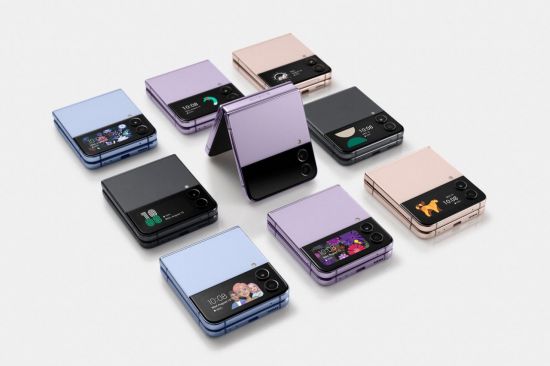
[Asia Economy Reporter Lim Hye-seon] Samsung Electronics announced that the 'Galaxy Z Flip4' provides an optimized experience tailored to each user through performance improvements and expanded foldable usability.
According to Samsung Electronics on the 10th, the compact Galaxy Z Flip4 has been improved to allow users to access more functions on the 1.9-inch cover screen without taking the phone out of their pocket and unfolding it. Quick setting features such as airplane mode, flashlight, and brightness adjustment have been enhanced, and users can register and use IDs and flight tickets through the Samsung Wallet feature.
Additionally, it is now possible to reply to messages by converting emoticons and voice to text, and users can call back missed calls or directly call contacts added to favorites.
There is also a 'Quick Shot' feature that allows easy shooting on the cover screen without opening the smartphone. Pressing the side button twice activates the camera, and swiping the cover screen left or right changes the shooting mode. In this Z Flip4, the Quick Shot feature has been further enhanced to support portrait mode shooting, and double-tapping the screen allows users to preview the image ratio of the actual photo.
The camera functions have also been improved. By folding the phone at the desired angle, users can take unique angle selfies that were difficult to capture with conventional smartphones anytime and anywhere. You can take selfies with the high-resolution rear camera while checking your appearance on the cover screen, enabling full-body shots that are difficult to take alone without a tripod. Even when switching to Flex mode during Quick Shot shooting, recording continues smoothly, making it useful for vlog shooting.
Productivity features using Flex mode have also been enhanced in the Z Flip4. By activating the 'Flex Mode Panel' in the 'Labs' menu, users can use the touchpad function in Flex mode, providing an experience similar to using a laptop. The touchpad allows control and clicking on the upper screen like a PC mouse cursor according to finger movements.
© The Asia Business Daily(www.asiae.co.kr). All rights reserved.

![Clutching a Stolen Dior Bag, Saying "I Hate Being Poor but Real"... The Grotesque Con of a "Human Knockoff" [Slate]](https://cwcontent.asiae.co.kr/asiaresize/183/2026021902243444107_1771435474.jpg)